Overview

This User Guide describes the basic functionality of your website theme and provides instructions for the most common tasks to manage and update your Chapter website. Use the links above for help with specific tasks.

If you have any problems, questions, or need access, please email webmaster@tdw.org

Admin Access

Once you log in, you will see the Admin Dashboard. To view the website, select Visit Site under the Texas Democratic Women menu item in the upper left-hand corner.

You will see the Admin menu at the top of your website when you’re logged in.

Click the Edit with WPBakery Page Builder link to use the frontend interface that replaces Beaver Builder we previously used. The interface is similar and best used for quick edits like changing images or updating text.

Click the Edit Page link to use the backend interface on the Admin side. This interface is sometimes easier to use if you’re adding new pages, extra content, or making significant changes.

Page Layout

Web page layouts contain rows of information that are divided into columns to hold different elements.

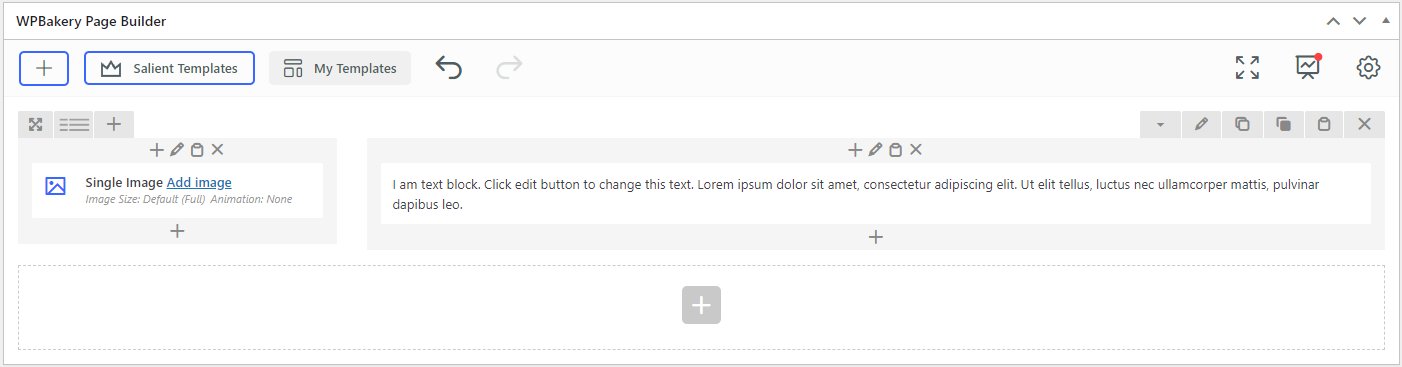
The overall page is pre-formatted with the correct header, footer, colors, and fonts so you only have to worry about the content of the page. The example below starts with a two-column row that contains a Single Image element in the left column and a Text Block in the right column.

Row Controls

Row Controls allow you to adjust the row settings. The most important actions are to define the number of columns, drag the row to rearrange, and duplicate an entire row.

Column Controls

Column Controls aren’t used much but they allow you to adjust the row settings like adding a background color or border.

The plus sign at the bottom of the column allows you to add new elements to that column.